Latest Apps :
Recent Apps
Showing posts with label blogging. Show all posts

How To Stop Redirecting your Blog Into Country Specific URL

All you know that when we enter www.google.com from India it automatically redirects into www.google.co.in Similarly now onwards blogger also redirects your Blog URL.


What for this country specific URL redirection ?

As laws are different in different countries, Google can freely block , remove content from specific blog according to their local law. And this blog will be visible to other countries in world.


Now how to break it:
1. Login in your account.
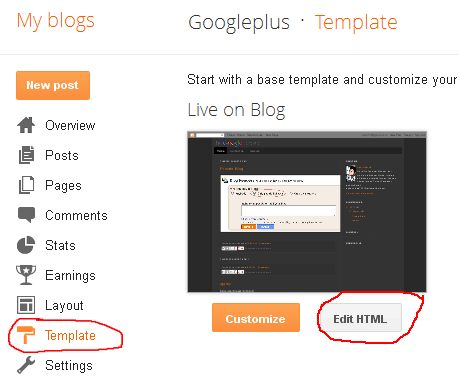
2. Now edit the template with html.


3. Copy Down the Below code and Paste after the Tag.

4. Now save it.

{[['']]}

Top 5 WordPress Backup Plugins For Your Blog & Website

Every Blogger Knows about wordpress. WordPress is one of the best blogging platform for Blogs. Most of the users are using WordPress these days and its CMS is also using by web developer. All the users worried about the backup. Backup is must do thing for all WordPress users. So today we decided to share some of the easy methods which allows you to take the WordPress Backup easily.


List is here:

WordPress database backup creates backups of your core WordPress tables. You can choose other tables also. Easy to use very simple, no need to schedule daily, weekly or monthly. Backup can be emailed to your email or stored on your server.


Another best WordPress plugin to manages your WordPress database. This one helps you manage, optimize and run queries on your database. Useful indeed. It provides complete database management right from the admin interface. 


Easy to use WordPress Plugin, it allows you to back up your WordPress Database with just one click. It also help you to create a full dump of your WordPress MySQL Database.


Simple automated back ups of your WordPress powered website. BackUpWordPress WordPress plugin will back up your entire site including your database and all your files once every day.


This Plugin is new and specially designed for PHP/Mysql websites. XCloner Backup tool uses Open Source standards like TAR and Mysql formats so you can rest assured your backups can be restored in a variety of ways, giving you more flexibility and full control. It can work as a native plugin for WordPress and Joomla.

 Now no need to worry just use these plugins for backup....
{[['']]}

What are Backlinks? How to get Quality Backlinks for SEO


What Are Backlinks?
Backlinks are inlinks, inbound links, incoming links (whatever you want to call it) pointing to a web page.The more the count of backlinks, the more popular the website is.
To Know More About Backlinks Read Wikipedia Article From Here.

How to Get Backlinks:

1.Forum Postings:-

This One is best method. In web forums you can place the links in signature or the message. Leaving comments in forums and where you leave your comments your signature also posted with your comments. Write quality content in forums to get more visitors for your Blog.


2.Directory Submissions:-

Just Register blog or website. Submit your blog at all popular directory submissions to get quality backlinks.

3.Blog Comments:-

This will also work. Just comment on popular sites. With this you will get backlinks and visitors.

4.Social Bookmarking:-

Register your Blog on all Social Networking Sites and get loyalty backlinks. 

5.Article Marketing:-
Write quality contents on those websites who have a good Page Rank and a good traffic rank also who accept Guest Posting. In that case you can get visitors, backlinks, page rank, increase your blog popularity. 

6.Links Exchanges:-

Link Exchange is the also the way to get backlink from your niche websites.Accept Link Exchanges in your website and make sure you can connect with good blogs links not low ranking blogs or other blogs. 

7.Get Backlinks By Uploading Videos:-
You can also make backlinks via uploading videos in video directory website like:-
Upload your videos like tutorials and more and also add your website signature in every video that you upload.


{[['']]}

How to add “Add me on google plus ” widget on your blog or website


Hello Guys,
Google+  is now going too fast in Social Networks Platform. So people loving Google+ more than Facebook and today we discuss that how to add Google+ widget on your blog.
Add me on google plus widget is a great tool for increasing your google plus friends and it looks so cool. This widget shows to your blog visitors that you are on google plus and asks them to add you on google plus. It provides link to your google plus account and also shows that how many people have added you to google plus. 

Just follow simple steps:

I) Go to your google plus account

First thing you need is your google plus id. For this you need to go to your google plus profile and look at the domain. It would look like this https://plus.google.com/#100801837223220570984/posts

II) Configure your google plus widget

  • After Finding Your Google+ Id Click Here To Visit Widgetplus Website.
  • Click on “get widget” button to open settings.
  • Paste your google plus id in the required option.


  • Customize other options according to your need.
  • After  all editing  click on get code button to get HTML code for your google plus widget.
III) Adding the code to your webiste

  1. Copy the HTML code which you got on clicking the get code button
  2. Paste that code in your blog.
  3. Now see your blog 
{[['']]}

How to Replace Your Blogger profile with Google+ profile

Heya!! Friends now you can change your blogger profile, Here is very simple trick for this and lots of benefits also.

The three main features that this shifting offers are:

  • You will get access to upcoming Google+ features on Blogger
  • your social connections (friends) will see your posts in their Google search results page with an annotation that tells them that you've shared the post. Thus increasing your blog traffic!
  • Most importantly it would give you one Unique identity. All your Google Accounts will now use one common name. Your Common is the nickname that you chose on Google+

Change Blogger Profile To Google+

  • Click this link: Switch to Google+ profile
  • Read the instructions carefully, agree to the terms and hit the "Switch Now" button
  • Done...


Important notes

  • Upon switching to your Google+ profile, you will have the option of reverting back to your Blogger profile for 30 days. After that, your Blogger profile data will be deleted.
  • Information on your Blogger profile won't be transferred to your Google+ profile, so copy your Blogger profile information to your Google+ profile before switching


{[['']]}
 
Support : Creating Website | Johny Template | Mas Template
Copyright © 2011. Free Android Apps Download - All Rights Reserved
Template Created by Creating Website Published by Mas Template
Proudly powered by Blogger