Latest Apps :
Recent Apps
Showing posts with label Intelligent Trick. Show all posts

How To Stop Redirecting your Blog Into Country Specific URL

All you know that when we enter www.google.com from India it automatically redirects into www.google.co.in Similarly now onwards blogger also redirects your Blog URL.


What for this country specific URL redirection ?

As laws are different in different countries, Google can freely block , remove content from specific blog according to their local law. And this blog will be visible to other countries in world.


Now how to break it:
1. Login in your account.
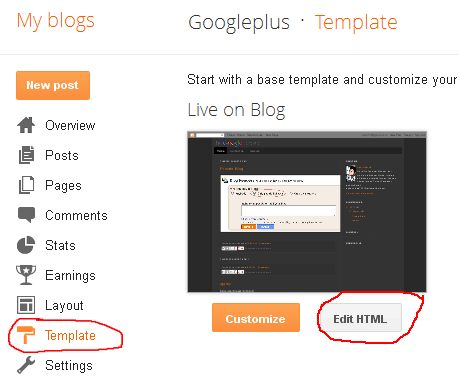
2. Now edit the template with html.


3. Copy Down the Below code and Paste after the Tag.

4. Now save it.

{[['']]}

How To Block Time Wasting Websites For Specific Time Period With Focal Filter

FocalFilter is a free productivity tool that helps you focus by temporarily blocking distracting websites. After the block timer runs out, your websites are available for you to view again.
  1. Run FocalFilter.
  2. You choose which websites to block.
  3. Set how long they should blocked for.
  4. Get more work done.


With millions of websites currently on the internet, it is very easy to get distracted from the work at hand. It starts with you opening a random link on YouTube or Facebook, and ends with an hour or two wasted before you even realize that you haven’t finished your work.


You can also block access to websites manually but the software called FocalFilter saves you from the trouble of changing settings manually and blocks the websites automatically for a particular time span.You just have to set the website name and time span for which you want to block the access. This software is for the windows operating system and after the completion of specified time access to blocked websites is revoked.


FocalFilter doesn’t allow you to unlock websites before the timer is up, which can be a big issue if you need to visit a blocked website for finishing an important task. What you can do is navigate to the hosts file titled “hosts” in the following directory C:\Windows\System32\drivers\etc, open it in native Windows Notepad, and delete the mapped URLs. Save the file and exit to unblock the websites.

FocalFilter lacks the option to add custom time and date for blocking the website list, and hope that the developer will include it in the next release. It works on Windows XP, Windows Vista and Windows 7 provided that Microsoft .NET Framekwork 4 is installed on your system.

Download FocalFilter

{[['']]}

10 Best Ways to Earn Money

Heya Happy Holi to all of you... I am enjoying this festival, its going awesome. But Posting is my duty so i have an interesting post for you. So enjoy my today's post...


{[['']]}

Charge Your iPhone With Your Own Breath | AIRE Mask

Go Green!!! Its time to save energy, The AIRE Mask is a breath of fresh air (pardon the pun) in the tech industry. Infusing new design energy (here we go again with the puns) in the rather staid segment of cellphone chargers, the AIRE Mask really does stands apart from the clique.
We’re all looking for ways to cut costs these days, and using less energy is a great technique. The AIRE Mask would help you cut down on electricity costs by using your own breath to charge your iPhone.


The device is basically a tiny wind generator that straps onto your face. Your breath turns interior turbines that produce electricity which goes straight to your phone. You can use it at any time – when you’re out exercising, at work, enjoying some quiet time with a good book or sleeping. Although to keep the suspicious looks to a minimum we would have to imagine that wearing the mask while sleeping is the best choice. According to the designer, the mask not only cuts down on energy usage but encourages users to be more active since more breathing = faster charging. I think its amazing.....
No surprises, that the AIRE Mask is just a concept for now and we don’t think it will be a reality anytime soon. However, it is the proud winner of the coveted Red Dot award, so the likelihood of it being a bonafied iPhone charger isn’t that remote (even at the risk of making you look like a very hip Hannibal Lecter).
{[['']]}

How To Use Trial Software Full Time By Editing Registry

This trick is amazing, Now need of any software for crack or for increase time period, just edit registry. This works upon 3rd party software, just applying simple steps you can easy crack any software. What we going to do, we will remove the trace that the software was previously installed in your computer and the next time again when you install the software it will not find the trace back that this software had been previously installed in this computer.


 Steps are here:
  1. First uninstall the software.
  2. Go to Start and just type “Regedit”.
  3. Now in 3rd step go to HK Local Machine -> Software -> Your Software name. Delete the Key. Do this for HK Current user if there exists a key of that software.
  4. Go to run type “%temp%. Delete all files. (it is for delete  temporary files)
  5. Go to Users -> Username -> Appdata Check all 3 directories that is “Local”, “LocalLow”, “Roaming” for your software entry. Delete that.
  6. Now just reinstall application and enjoy the next trial :). You can use this every time.....
{[['']]}

How to Create SmartPhone App without Coding

It is great if you know computer coding. But what about those people who dont know even a single word of coding. But thankfully, there are applications and web developers out there who provide ways for the rest of us to produce apps with little or no coding skills.
Infinite Monkeys’ web-based graphic user interface allows users to incorporate existing web content from social networking sites like Twitter, Flickr, YouTube, and blogging sites.
Infinite Monkey provides a seriously easy step-by-step process for creating a smartphone app in less than an hour; that is if you have an ample amount of content already posted on the web.
The great thing about using a web-based platform is that you can constantly add content and updates to your app via your blog site, YouTube channel, photo sharing site, etc.


MAKE your own mobile app

  • It provide drag-and-drop platform allows anyone to simply create their own mobile social network, for FREE.
  • With this you can Promote your business, your restaurant or your music band. Maybe you just want a private space to share with your BFF’s. It’s all up to you.
  • You decide what you want in your app: Photo sharing, Videos, Twitter feeds, Community Walls, Live Chat rooms, etc.
  • Apps made on this run on iPhone, Android and HTML5 web-enabled smartphones.
  • Best point is you don't need to know any programming.
  • It just take 20 minutes. 
So enjoy it and use it....


{[['']]}
 
Support : Creating Website | Johny Template | Mas Template
Copyright © 2011. Free Android Apps Download - All Rights Reserved
Template Created by Creating Website Published by Mas Template
Proudly powered by Blogger